Decommissioning: shutting down without losing anything
A legacy system kept alive only so that somebody could look something up is one of the most expensive insurance policies in IT. The alternative is not deletion – it is taking the data over so the system can finally go.
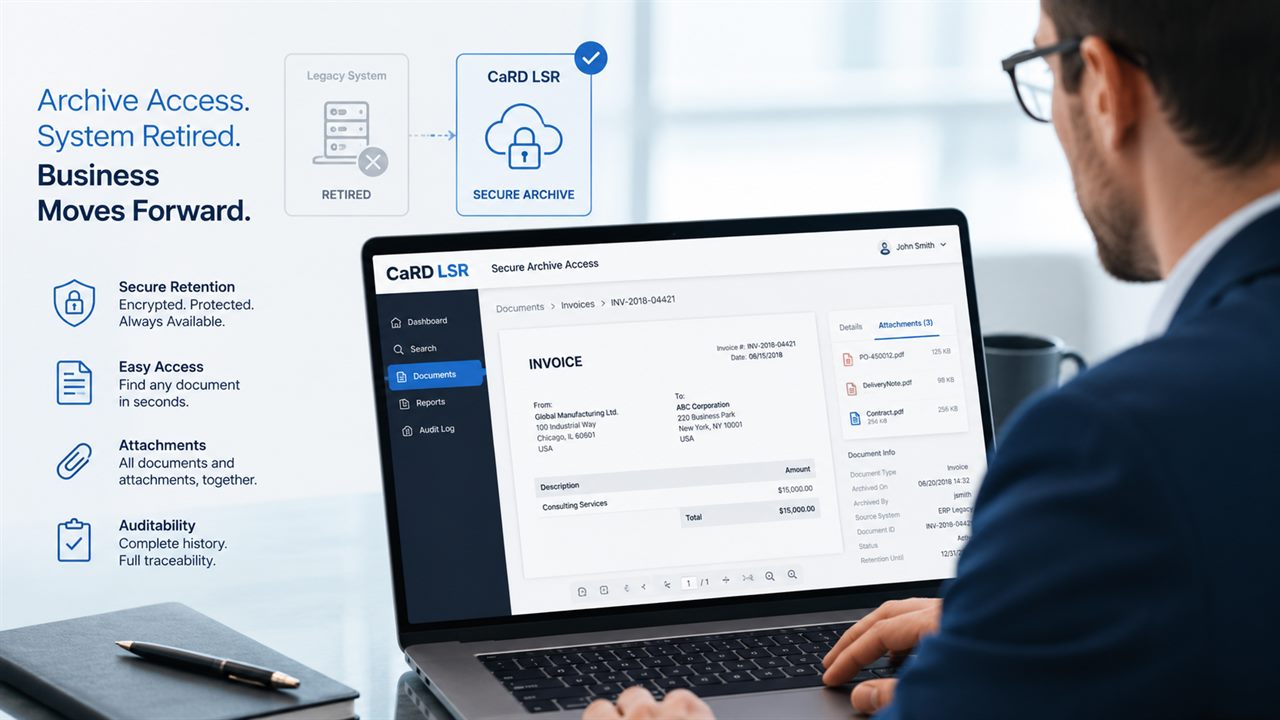
At a glance
- Fully retire SAP and non-SAP legacy systems
- Including ADK files, DART, cluster tables & attachments
- Research interface for departments and auditors
- Compliant and GDPR-ready, with legal hold
- Free choice of storage: Azure, SharePoint, AWS S3 or STACKIT
- Documented shutdown and deletion process
- Optional AI: tagging, classification & semantic search
Why legacy systems survive for so long
After a migration, carve-out or consolidation something almost always remains: an ECC nobody posts to any more, an acquired third-party system, an archive server from an earlier era. It still does not get switched off – because nobody is sure whether everything subject to retention really exists elsewhere. So licences, maintenance, hardware and operational effort keep running, often for years.
The way out is a complete, provable take-over of the relevant data. Complete means more than many expect: not only documents and master data, but also ADK archive files from earlier archiving runs, DART extracts for tax audits, cluster tables holding long texts (such as STXH/STXL) and binary objects, plus the attachments from GOS and DMS. If one of these categories is left behind, the shutdown does not hold up.
Just as important as the take-over is later access. An archive only specialists can read with dedicated tooling does not help accounting answer a query. That is why a research interface belongs to it – one in which departments, internal audit and tax auditors search themselves, open original documents, reconstruct reports and export them, without the legacy system running.
In legacy inventories in particular, an optional AI connection helps noticeably. Who chose which filing logic twelve years ago is often no longer known — metadata is missing, document types were assigned inconsistently, duplicates have accumulated across system boundaries. Automatic tagging and classification give the transferred inventory structure after the fact, semantic search makes it usable for departments and auditors without anyone knowing the old field names, and in processing duplicates and anomalies can be spotted before they move into the new archive. The know-how for this comes from our own development.
Here too: the AI is opt-in and replaces nothing. Classic retrieval by document number, partner and period remains fully intact, and operation is possible on-premise or in a sovereign EU cloud — regularly the decisive question with data subject to retention. Automatically assigned keywords are a reviewable suggestion; the evidence itself stays with the transferred original data.
Our complete solution for this is CaRD LSR (Legacy System Retirement). It covers SAP landscapes as well as non-SAP ERP; the full product presentation lives at card-lsr.com. This page is about the approach and the questions to settle before deciding.
What gets taken over
Completeness decides whether the shutdown really holds.
- Transactional and master data
- ADK archive files from earlier archiving runs
- DART extracts for tax audits
- Cluster tables & long texts (e.g. STXH/STXL)
- GOS and DMS attachments, ArchiveLink inventories
- Print lists and outbound documents
Which systems
What matters are the retention obligations, not the origin of the data.
- SAP: ECC, S/4HANA, BW, HCM, GTS
- Oracle E-Business Suite, JD Edwards
- Microsoft Dynamics AX, Navision
- IBM Mainframe and AS/400 (IBM i)
- DMS/ECM systems, file servers, custom applications
Access after shutdown
The part by which decommissioning projects are judged in daily life.
- Search across documents, partners and periods
- Open original documents directly
- Reconstruction of reports
- Export for auditors and departments
- Authorisation concept for archive access
AI on the legacy inventory (optional)
Creating structure after the fact where none was maintained over the years.
- Automatic tagging of the transferred inventory
- Classification of inconsistently filed document types
- Semantic search without knowing the old field names
- Spotting duplicates and anomalies before take-over
- Operation on-premise or in a sovereign EU cloud
- Opt-in — classic retrieval stays unchanged
Law & compliance
So the shutdown is still defensible in five years.
- Immutable, compliant storage
- GDPR: deletion concepts and retention periods
- Legal hold for ongoing proceedings
- Complete audit trail
- Documented evidence of the take-over
Typical triggers
When the topic reaches the table.
- S/4HANA move – the ECC should finally go
- Carve-out, M&A and post-merger data separation
- Insolvency and legally sound retention
- Consolidation of landscapes that have grown
- Expiring maintenance or hardware replacement
Approach
Four steps from analysis to a documented shutdown.
- Analysis: what has to be kept, and for how long?
- Take-over and audit-proof storage
- Sign-off on access by the departments
- Orderly shutdown with evidence
Frequently asked questions
Do we have to define in advance what should be kept?
You can define the scope up front, but you do not have to. In practice we work it out together – starting from retention obligations and the actual need for information. When in doubt we take over the complete relevant inventory; that is usually cheaper than a long scoping debate.
Are ADK files and archive documents taken over as well?
Yes. Besides transactional data we take over ADK archive files, DART extracts, cluster tables with long texts and binary objects, plus attachments and ArchiveLink inventories. This is exactly where decommissioning projects otherwise fail.
How do departments access the data afterwards?
Through a research interface: search, open original documents, reconstruct reports and export them. Without specialist knowledge and without the retired system having to run.
Can AI help with the legacy inventory?
Yes, and the benefit is particularly large here: legacy systems lack metadata, document types were assigned inconsistently and duplicates have accumulated across system boundaries. Automatic tagging and classification give the inventory structure after the fact, semantic search makes it usable without anyone knowing the old field names, and duplicates can be identified before they move into the new archive. The functions are opt-in; classic retrieval by document number, partner and period stays unchanged.
Is that compatible with data subject to retention?
Yes, if the framework is right — and we define that up front. Operation is possible on-premise or in a sovereign EU cloud, and which content a model gets to see at all is part of the concept. Importantly, the evidence stays with the transferred original data; automatically assigned keywords are an additional access aid, not a substitute for the document.
Where is the data stored afterwards?
You decide. The approach is storage-neutral: Microsoft Azure Blob Storage, Microsoft SharePoint Online, AWS S3 or STACKIT as a sovereign EU cloud. You choose region and provider, and operation is possible on-premise or in the cloud.
Which costs disappear with decommissioning?
Typically licence, maintenance and infrastructure cost of the legacy system, plus the operational effort for patches, backups and audits. The initiative frequently pays for itself after a comparatively short time – we calculate that up front using your figures.
Can non-SAP systems be retired too?
Yes. Oracle E-Business Suite, JD Edwards, Dynamics AX and Navision, IBM Mainframe and AS/400, DMS/ECM systems, file servers and custom applications are all part of the repertoire.
Does this match your project?
Talk directly to our consultants — no detours.